
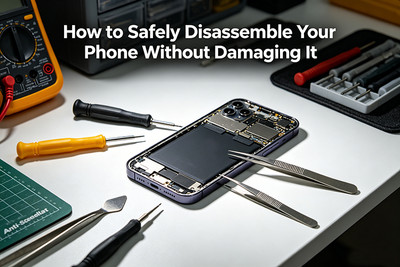
How to Safely Disassemble Your Phone Without Damaging It
You've watched the YouTube videos. You've bought the repair kit. You're staring at your cracked screen or dying battery, ready to finally fix it yourself. But there's a knot in your stomach. What if you break something? What if you can't put it back together? What if that tiny screw flies into another dimension, never to be seen again?
Deep breath. You've got this.
Every professional repair technician started exactly where you are now. And every single one of them learned that safe disassembly isn't about strength—it's about patience, the right technique, and knowing what NOT to do.
This masterclass will walk you through every principle, tool, and technique you need to open your phone without causing damage. Consider this your insurance policy against costly mistakes.
The Golden Rules of Phone Disassembly
Before you touch a single screw, memorize these five commandments. They will save you more times than you can count.
Rule #1: Disconnect the Battery FIRST, Reconnect It LAST
This is not optional. This is not "usually" important. This is the single most critical rule in all of electronics repair.
Working on a phone with the battery connected is like performing surgery on a patient whose heart is still beating. One slip of a metal tool can create a short circuit that instantly fries components on your logic board.
The Ritual: Before removing any cable or component, disconnect the battery connector. When reassembling, connect the battery dead last after everything else is in place.
Rule #2: Never Force Anything
If it doesn't move, you missed a screw. If it won't separate, there's still adhesive. If a connector won't release, you haven't lifted the locking flap.
The Phone's Mantra: Phones are not held together by brute force. They are held together by precision engineering. Forcing a component is the fastest path to a broken phone.
Rule #3: Use the Right Tool for Every Job
A butter knife is not a pry tool. A paperclip is not a SIM ejector (okay, sometimes it is, but that's the exception). Your fingernails are not screwdrivers.
The Investment: A proper repair toolkit costs less than a single professional repair. It pays for itself on your first fix.
Rule #4: Work in a Clean, Organized, Magnified Space
Lost screws, misplaced components, and unseen debris are the enemies of successful reassembly.
The Setup: A white towel or silicone mat (prevents rolling), magnetic project mat (holds screws), bright LED light, and magnification (even reading glasses help).
Rule #5: Document Everything
Your memory is a liar. You will not remember exactly which screw went where or which cable routed over or under that bracket.
The Evidence: Take photos before every step. Use your phone's camera (ironic, we know) to capture cable routing, screw positions, and connector orientations.
Essential Tools and Their Proper Use
You don't need a professional repair shop's full arsenal, but you need quality versions of these essentials.
| Tool | Purpose | What to Avoid |
|---|---|---|
| Precision screwdriver set | Removing tiny screws (Phillips #000, Pentalobe, Torx) | Cheap bits that strip screws |
| Plastic pry tools | Separating adhesive, lifting connectors | Metal tools that scratch and short |
| Suction cup | Lifting screens and back glass | Pulling too hard without adhesive softening |
| Spudger (nylon or ceramic) | Disconnecting cables, prying delicate components | Metal spudgers (conductive) |
| Tweezers (ESD-safe) | Handling small screws and components | Sharp tweezers that slip and scratch |
| Magnetic project mat | Organizing and labeling screws | Loose screws on a cluttered desk |
| iOpener or heat gun | Softening adhesive | Hair dryers on high heat (uneven heating) |
| SIM ejector tool | Removing SIM card tray | Paperclips (can bend and get stuck) |
The 10-Step Disassembly Protocol
Follow this sequence for virtually any smartphone. Specific models have variations, but the principles remain constant.
Step 1: Prepare Your Workspace
- Clear a flat, clean surface (no clutter, no pets, no kids).
- Lay down a white towel or silicone mat (prevents scratches and rolling screws).
- Set up bright, directional lighting (a desk lamp works perfectly).
- Have your camera ready to document each step.
- Remove your phone case and screen protector.
Step 2: Power Down and Remove SIM Card
- Power off the phone completely (not just sleep mode).
- Remove the SIM card tray using the ejector tool.
- Why: A powered phone can short. A SIM tray left in can catch on internal components during disassembly.
Step 3: Apply Heat to Soften Adhesive
Modern phones are held together by industrial-strength adhesive. Cold adhesive is a rock. Warm adhesive is gum.
The Safe Heating Method:
- Use an iOpener (microwavable heating pad) or a heat gun on low setting (250-300°F / 120-150°C).
- Heat the edges of the screen or back glass for 2-3 minutes.
- Never concentrate heat in one spot—keep the source moving.
- Never overheat—if it's too hot to touch comfortably, it's too hot for your phone.
Pro Tip: A hair dryer on medium heat, held 6 inches away and moving constantly, works in a pinch. But an iOpener is safer and more consistent.
Step 4: Create the First Opening
- Place a suction cup near the bottom edge of the screen or back glass.
- Gently pull up to create a tiny gap.
- Insert a plastic pry tool into the gap—no more than 2-3 millimeters deep.
- Do not pry yet. You're just creating a entry point.
Warning: If the glass doesn't lift with gentle suction, apply more heat. Never force.
Step 5: Separate the Adhesive Perimeter
- Slide the plastic pry tool along the edge in a sawing, not prying, motion.
- Insert small plastic picks or playing cards to hold the gap open as you work.
- Work slowly around the entire perimeter.
- Listen for the sound of adhesive releasing, not the sound of glass cracking.
The Clockwise Method: Start at the bottom, work up one side, across the top, and down the other side. Consistent motion prevents missed spots.
Step 6: Lift and Prop Open the Assembly
- Once the adhesive is fully separated, lift the screen or back glass from the bottom up (like opening a book).
- Do not pull it away completely yet—delicate ribbon cables still connect it to the phone.
- Prop it open at a 45-90 degree angle using a small foam block or a roll of tape.
Why this matters: Pulling too far can tear flex cables. Propping keeps tension off the cables while you work.
Step 7: Locate and Remove Internal Screws
- Use your magnetic mat to organize screws by location.
- Take a photo of the screw layout before removing any.
- Use the correct size screwdriver—too small strips the head, too large damages the threads.
- Apply downward pressure while turning to prevent camming out.
The Screw Rule: Different screws have different lengths. Putting a long screw in a short hole can puncture a cable or the logic board. Label everything.
Step 8: Remove Brackets and Covers
- Use tweezers or your pry tool to lift metal brackets and plastic covers.
- Take another photo of what's underneath before disconnecting anything.
Step 9: Disconnect the Battery (The Most Important Step)
- Locate the battery connector on the logic board.
- Use a spudger (nylon or ceramic) to gently pry up the connector.
- Do not pull on the wires—only lift the plastic connector housing.
- Confirm disconnection by attempting to power on the phone (it shouldn't).
Pro Tip: On iPhones, the battery connector often has a small metal bracket screwed over it. Remove that bracket first.
Step 10: Disconnect All Other Cables
- Now you can safely disconnect the display, digitizer, and other flex cables.
- Use the same gentle spudger technique—lift at the connector, not the wires.
- Pay attention to orientation (which side is up, which cable goes where).
- Take final photos of cable routing before fully removing the assembly.
The Most Common Disassembly Mistakes (And How to Avoid Them)
| Mistake | Why It's Dangerous | The Fix |
|---|---|---|
| Skipping heat application | Cold adhesive causes glass to crack | Heat for 2-3 minutes minimum |
| Using metal pry tools | Scratches and creates electrical shorts | Use plastic or nylon tools only |
| Prying instead of sawing | Concentrated force cracks glass | Use a sliding, sawing motion |
| Forgetting screws under stickers | Hidden screws cause forced prying damage | Check every sticker and rubber plug |
| Pulling cables by the wires | Tears the delicate traces | Lift only the plastic connector |
| Working without magnification | Misses tiny screws or damaged pins | Use reading glasses or a magnifying lamp |
| Rushing the process | Leads to every mistake above |
Plan for 1-2 hours, not 20 minutes |
The Documentation System: Your Safety Net
rofessional technicians don't rely on memory. Neither should you. Here's a simple system:
Before Any Step:
Take a wide photo of the entire phone interior.
Before Removing Screws:
Take a close-up photo of their exact positions.
Before Disconnecting a Cable:
Take a photo showing its orientation and routing path.
Mid-Disassembly:
Take photos of the bracket order (which bracket goes on top of which).
Storage: Keep these photos in a dedicated album on your phone or cloud storage. You'll reference them constantly during reassembly.
Special Cases: Phones That Break the Rules
iPhones (Especially Recent Models)
- Require Pentalobe screwdrivers for the bottom screws.
- Have extremely strong adhesive—more heat, more patience.
- Feature fragile back glass that can shatter even with proper technique.
Samsung Galaxy S and Note Series
- Use strong waterproof adhesive—consider buying a adhesive removal solution.
- Have curved edges that make screen removal trickier.
- Require careful cable routing during reassembly.
Foldable Phones (Z Fold, Z Flip, Pixel Fold)
- Do not attempt DIY disassembly without professional training.
- The hinge mechanism is incredibly complex.
- One wrong move can destroy the folding display permanently.
Older Phones (Pre-2015)
- Often have clips instead of adhesive—use plastic cards to release them.
- May have soldered components that aren't replaceable.
- Require more force (but still never brute force).
Pre-Reassembly Checklist
Before you start putting your phone back together:
- All old adhesive removed from frame.
- All surfaces cleaned with isopropyl alcohol.
- New adhesive strips or glue ready.
- All replacement parts tested (screen, battery, etc.).
- Screws organized and accounted for.
- Photos reviewed and understood.
The Final Truth: Skill Comes From Practice
Here's what no YouTube video tells you: every professional damaged their first phone.
Maybe they stripped a screw. Maybe they tore a cable. Maybe they cracked a screen that wasn't cracked before. It happens. It's part of learning.
The difference between an amateur and a pro isn't that the pro never makes mistakes. It's that the pro learns from them, slows down, and doesn't repeat them.
Your first disassembly will feel terrifying. Your fifth will feel routine. Your tenth will feel automatic.
Start with a phone that matters less. Practice on an old device. Build your confidence. Then tackle your daily driver.
When to Stop and Call a Professional
If at any point you encounter:
- A screw that won't turn (stripped or seized)
- A cable that won't disconnect (possible locking mechanism you missed)
- Cracking sounds (glass is failing)
- Visible damage (you've already made a mistake)
Stop. Take a breath. Evaluate whether continuing is worth the risk. Sometimes the smartest repair decision is knowing when you're out of your depth.
Recent Posts
-
How to Use UV Glue for OLED Screen Replacement: Complete DIY Guide
Replacing an OLED screen is one of the most rewarding smartphone repairs—but it's also one of the ea …Jul 17, 2026 -

Dead Pixels on Phone Screen: Can You Fix Them?
Have you noticed a tiny black dot on your phone screen that never changes color—no matter what app y …Jun 25, 2026 -

Why Fast Charging Isn’t Always Good for Your Phone
You've seen the ads. "50% charge in 15 minutes!" "Full battery in under an hour!" "Charge faster tha …May 29, 2026