
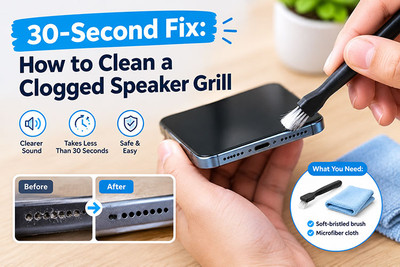
30-Second Fix: How to Clean a Clogged Speaker Grill
Your phone's speaker used to be loud and clear. Now it sounds muffled, distorted, or barely audible. Before you assume the speaker is blown or start researching repair costs, there's a simple truth you need to hear:
Your speaker isn't broken. It's clogged.
Pocket lint, dust, and everyday grime accumulate in the tiny holes of your speaker grille, creating a physical barrier that blocks sound waves. The fix takes literally 30 seconds—and it's completely free.
Why Speaker Grills Get Clogged
Your phone's speaker grille is a mesh of microscopic holes designed to let sound out while keeping dust and debris in. But over months and years, that mesh becomes a trap for:
| Culprit | How It Gets In |
|---|---|
| Pocket lint | Your phone lives in your pocket, rubbing against fabric all day |
| Dust particles | Floating in the air, settling into the grille holes |
| Dead skin cells | Yes, really—they accumulate just like lint |
| Oil and sweat | Creates a sticky surface that traps everything else |
| Food crumbs | If you use your phone while eating (we all do) |
The result? Sound waves have to fight through a clogged barrier. Volume drops, clarity suffers, and your phone sounds like it's underwater.
The 30-Second Fix
What You'll Need:
- A soft-bristled toothbrush (clean, dry, and dedicated to this purpose)
- A wooden toothpick (optional, for stubborn debris)
- Compressed air (optional, but helpful)
- Isopropyl alcohol (70% or higher) and a cotton swab (for sticky grime)
The Method:
Step 1: Power Off Your Phone
Simple safety step. Turn it off completely.
Step 2: Brush the Grille (15 seconds)
Take your soft-bristled toothbrush and gently brush across the speaker grille in one direction. Don't scrub back and forth—you're trying to sweep debris out, not push it deeper in.
- For the bottom speaker: Brush upward and outward.
- For the earpiece speaker: Brush across the top edge of the screen.
Step 3: Blow Out the Debris (10 seconds)
Use a can of compressed air. Hold it at a 45-degree angle and use short bursts. Never hold it upside down (liquid propellant can spray out).
No compressed air? Use the toothbrush again or gently blow with your mouth (but don't spit).
Step 4: Tackle Sticky Grime (5 seconds, if needed)
If the grille still looks clogged, dip a cotton swab in isopropyl alcohol (70% or higher) and gently wipe across the grille. The alcohol dissolves oils and evaporates quickly.
Warning: Do not drip alcohol into the grille. Dampen the swab, don't soak it.
Step 5: Test the Sound
Play a song or video at full volume. You should notice an immediate improvement.
What NOT to Use on a Phone Speaker Grill
Cleaning a speaker grill seems simple, but using the wrong method can cause more damage than the original problem.
Don't Use a Needle or SIM Eject Tool
It may be tempting to poke individual holes in the grill, but sharp metal objects can:
- Damage the speaker mesh
- Puncture protective material
- Scratch the phone
- Push debris deeper into the device
A speaker grill isn't something you should scrape aggressively.
Don't Pour Alcohol or Water Directly Onto the Grill
Liquid can enter the phone through the speaker openings.
Even when a phone has some water resistance, that doesn't mean you should intentionally introduce liquid into its openings.
If you use any cleaning solution on the exterior, apply appropriate caution and follow the device manufacturer's cleaning instructions. Never soak the speaker area.
Avoid Blowing Hard Into the Speaker
Blowing directly into the grill can push moisture and debris further into the phone.
Compressed air can also be risky when used incorrectly because excessive pressure may damage delicate components or force debris deeper into the device.
For routine cleaning, a soft, dry brush is the safer first option.
Don't Press Sticky Materials Deep Into the Grill
Some people use adhesive putty to pull out dirt. If used incorrectly, it can leave residue or become lodged in the speaker openings.
If you choose any specialized cleaning material, make sure it is specifically designed for electronics and follow its instructions carefully.
What If Cleaning Doesn't Fix the Muffled Sound?
If your phone's speaker is still quiet after cleaning, the problem may not be caused by surface debris.
Possible causes include:
1. Damaged Speaker
A damaged or worn speaker module can produce:
- Low volume
- Crackling
- Distortion
- Intermittent sound
- No sound
In this situation, cleaning the grill won't solve the underlying hardware problem.
2. Liquid or Moisture Damage
Moisture entering the speaker area can affect sound quality. The speaker may sound muffled or distorted even after the outside of the grill appears clean.
If the phone has recently been exposed to water or another liquid, avoid repeatedly charging or operating it if there are signs of significant liquid damage and seek appropriate professional inspection.
3. Software or Audio Settings
Before replacing hardware, check the phone's volume settings and audio configuration.
Try:
- Increasing media volume
- Increasing call volume during a call
- Disconnecting Bluetooth headphones or speakers
- Restarting the phone
- Checking whether the problem occurs in multiple apps
If headphones sound normal but the phone's built-in speaker remains quiet, the speaker assembly or its connection may need further inspection.
4. Damaged Speaker Mesh or Housing
If the phone has been dropped, the speaker grill or surrounding housing may be physically damaged.
A damaged mesh can restrict sound or allow debris to reach components that should be protected.
How to Tell If Your Speaker Grill Is Actually Clogged
A clogged grill is more likely when:
- The speaker became quieter gradually
- The phone has been carried in a pocket frequently
- You can visibly see dust or lint covering the openings
- Sound improves temporarily when the grill is cleaned
- The speaker itself isn't producing obvious crackling or electrical distortion
If the speaker suddenly stopped working after a drop, water exposure, or repair, cleaning the grill may not be enough.
Speaker Grill Cleaning After a Screen Replacement
Phone repairs can sometimes introduce dust or debris around openings that were previously covered.
If you're replacing a phone screen, housing, battery, or other internal component, it's a good idea to inspect the speaker openings before completing the repair.
However, avoid using excessive force around the speaker assembly. Depending on the phone model, the speaker, mesh, adhesive, and surrounding components can have very different designs.
Always follow a repair guide specific to the exact phone model.
When Should You Replace the Speaker?
Consider further diagnosis or speaker replacement if:
- Cleaning produces no improvement
- The speaker is completely silent
- Audio remains heavily distorted
- The phone was dropped and the problem started afterward
- The device experienced liquid exposure
- The speaker was damaged during a previous repair
A replacement speaker or speaker flex may solve the problem when the original component has failed.
Quick Reference: The 30-Second Routine
For everyday maintenance, remember this simple routine:
Power off → Soft brush → Gentle strokes → Wipe → Test
It takes less than a minute and can help prevent dust and lint from building up around the speaker openings.
You don't need to disassemble your phone just because the speaker sounds muffled.
How to Prevent Future Clogs
Prevention is easier than cleaning. Here's how to keep your speaker grille clear:
- Use a phone case with speaker mesh protection – Many cases have built-in mesh covers that block debris while letting sound through.
- Avoid keeping your phone in lint-heavy pockets – If you must, use a pouch or holster.
- Clean your phone weekly – A quick 10-second brush prevents buildup from becoming a problem.
- Keep food away from your phone – Crumbs are the enemy.
- Avoid humid environments – Moisture makes debris stickier and harder to remove.
If your phone speaker sounds muffled, don't immediately assume the speaker is broken.
A layer of dust or pocket lint can block the speaker grill and reduce sound quality. In many cases, a few gentle passes with a clean, soft-bristled brush can make a noticeable difference in around 30 seconds.
If cleaning doesn't restore normal sound, the next step is to determine whether the problem is related to the speaker itself, software, moisture, physical damage, or another internal component.
For repair technicians and DIY enthusiasts, proper diagnosis before replacing parts can save both time and money.
Looking for quality replacement parts for your next phone repair? Explore Parts4Repair for replacement screens, charging ports, batteries, cameras, flex cables, and other repair parts.
Recent Posts
-
30-Second Fix: How to Clean a Clogged Speaker Grill
Your phone's speaker used to be loud and clear. Now it sounds muffled, distorted, or barely audible. …Sep 10, 2026 -
How to Use UV Glue for OLED Screen Replacement: Complete DIY Guide
Replacing an OLED screen is one of the most rewarding smartphone repairs—but it's also one of the ea …Jul 17, 2026 -

Dead Pixels on Phone Screen: Can You Fix Them?
Have you noticed a tiny black dot on your phone screen that never changes color—no matter what app y …Jun 25, 2026