
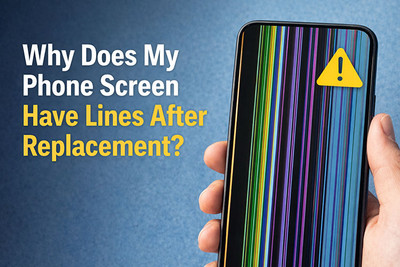
Why Does My Phone Screen Have Lines After Replacement?
You’ve successfully replaced your phone’s screen, feeling a rush of accomplishment. But when you power it on, your victory is instantly soured by a web of colorful lines, flickering bars, or a striped display. This is one of the most common and disheartening post-repair issues.
Before you panic or assume the new screen is a dud, understand that screen lines are a symptom, not the disease itself. They are your phone’s way of crying out that the digital signal from the logic board to the display is compromised.
This guide will walk you through the exact causes, a step-by-step diagnostic process, and the real solutions to fix a lined screen after replacement.
Understanding the Problem: What Do the Lines Mean?
The pattern and behavior of the lines are critical clues. Use this table to identify your specific issue:
| Type of Line/Issue | Likely Cause | Visual Clue |
|---|---|---|
| Thin, multi-colored vertical/horizontal lines | A loose or poorly seated display cable (Flex Cable). | Lines may appear static or change when you gently press on the screen near the connector. |
| A section of the screen is black with lines at the edge | A pinched or torn Flex Cable. | The damaged area is often localized to one part of the screen (top, bottom, side). |
| Flickering lines or a "screen tear" effect | Incompatible or low-quality screen, or a failing display driver on the logic board. | The lines seem to move or shimmer, especially when the screen content changes. |
| Green, purple, or yellow tinted lines | Damage to the display connector on the logic board (bent pins). | The colored tint is consistent across the lines. |
| Lines only appear under bright white backgrounds | A lower-quality LCD (if your original was OLED) or a defective panel. | May be subtle and only visible in certain apps like Notes or Settings. |
Step-by-Step Diagnosis: Find the Root Cause
Safety First: Power down your phone and disconnect the battery before performing any internal checks. If your battery is not removable, simply ensure the device is off.
Step 1: The Re-Seat Test
Likely Cause: Loose connection.
The Fix:
- Carefully reopen your phone.
- Disconnect the battery (if possible).
- Gently unplug the display flex cable(s) from the logic board.
- Visually inspect the connector and cable gold contacts for dust, lint, or damage.
- Firmly and evenly reconnect the cable until it clicks or seats fully. Avoid bending it at sharp angles.
- Reconnect the battery, power on, and test.
This single step solves over 50% of post-replacement line issues.
Step 2: Inspect for Physical Damage
Likely Cause: Pinched cable or damaged connector.
The Fix:
- Examine the flex cable along its entire length, especially where it bends around the frame. Look for creases, tears, or shiny stress marks.
- Inspect the logic board connector under bright light. Use a magnifying glass if needed. Look for bent, missing, or corroded pins.
Step 3: Test with the Old Screen (If Possible)
Likely Cause: Defective or incompatible new screen.
The Fix:
- Reconnect your original, broken screen.
- If the lines disappear, your new replacement screen is faulty or incompatible.
- If the lines persist, the problem is with your phone’s logic board, connector, or another component.
This is the most definitive test to determine if the part is bad.
Step 4: Check for Frame Pressure or Debris
Likely Cause: Physical pressure on the screen or cable.
The Fix:
- Ensure no screws are too long and pressing on the back of the display.
- Check that no debris or leftover adhesive is trapped between the screen and the frame/cable.
- Verify the screen is sitting perfectly flush and isn't being forced into a warped frame.
When It’s Not the Screen: The Hidden Hardware Culprits
If you’ve re-seated the cable, tested with the old screen (and it worked), and ensured there's no physical damage, the issue may be deeper.
- Damaged Display Connector (Logic Board): The port on the motherboard itself can have damaged solder joints from previous repairs or drops. This requires microsoldering by a professional.
- Faulty Display IC (Integrated Circuit): A tiny chip on the logic board responsible for processing the video signal can fail. This is also a professional microsoldering repair.
- Incompatible Screen Version: Some phones (like certain iPhone or Samsung models) have multiple screen variants for different regions or production runs. Installing the wrong variant can cause lines or a total lack of function.
The Ultimate Action Plan: What to Do Next
Follow this flowchart to resolve your issue:
- Re-seat the display cable connection. → If lines persist...
- Carefully inspect the cable and logic board connector for damage. → If no damage found...
- Test with the old/original screen.
- If old screen works: Your new screen is defective. Contact your parts supplier for a replacement under warranty.
- If old screen also has lines: The problem is with your phone's logic board or internal connector. This requires professional repair.
How to Prevent This in Your Next Repair
- Buy Quality Parts: Avoid the cheapest screens online.
- Handle Cables with Care: Never pull on a flex cable; use your fingernail or a plastic tool at the connector's pull-tab.
- Keep It Clean: Ensure no dust or debris is in the connector before reassembly.
- Test Before Final Assembly: Before sealing the phone with adhesive, do a full power-on test to confirm everything works.
When to Call a Professional
Seek a skilled technician if:
- You find bent pins in the logic board connector.
- The flex cable is torn.
- The old screen also shows lines (indicating a board-level issue).
- You are uncomfortable performing the diagnostics above.
A professional with the right tools can perform board-level diagnostics and repair, which is often more cost-effective than buying multiple replacement screens or a new phone.
Recent Posts
-

Why Does My Phone Screen Have Lines After Replacement?
You’ve successfully replaced your phone’s screen, feeling a rush of accomplishment. But when you pow …Jan 08, 2026 -

No Sound on Calls? Here’s the Hidden Setting You Missed
Few things are as frustrating as picking up a call only to be met with dead silence. You can see the …Dec 25, 2025 -

The Rise of DIY Repairs: Why More People Are Fixing Their Own Devices
For years, device repair felt like something only trained technicians could handle. But times have c …Dec 09, 2025